> ## Documentation Index
> Fetch the complete documentation index at: https://gr-docs.aporia.com/llms.txt
> Use this file to discover all available pages before exploring further.
# OpenAI Proxy
## Overview
In this method, Aporia acts as a proxy, forwarding your requests to OpenAI and simultaneously invoking guardrails. The returned response is either the original from OpenAI or a modified version enforced by Aporia's policies.
This integration supports real-time applications through streaming capabilities, making it particularly useful for chatbots.
If you're just getting started and your app is based on OpenAI or Azure OpenAI, **this method is highly recommended**.
All you need to do is replace the OpenAI Base URL and add Aporia's API Key header.
## Prerequisites
To use this integration method, ensure you have:
1. [Created an Aporia Guardrails project.](/fundamentals/projects#creating-a-project)
## Integration Guide
### Step 1: Gather Aporia's Base URL and API Key
1. Log into the [Aporia dashboard](https://guardrails.aporia.com).
2. Select your project and click on the **Integration** tab.
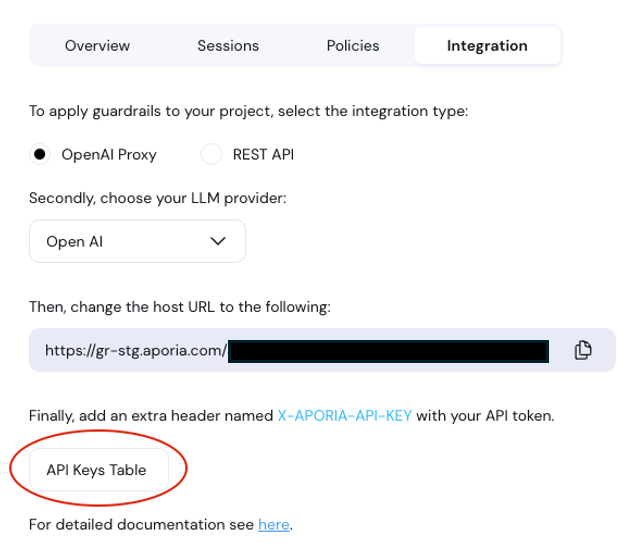
3. Under Integration, ensure that **Host URL** is active.
4. Copy the **Host URL**.
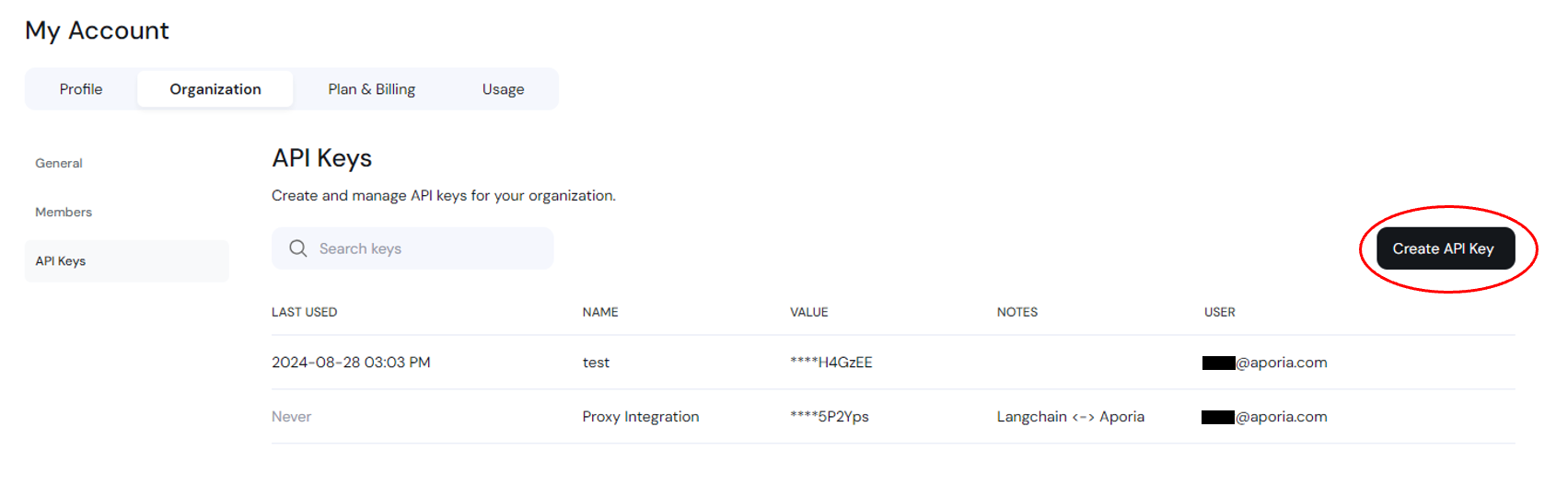
5. Click on **"API Keys Table"** to navigate to your keys table.
6. Create a new API key and **save it somewhere safe and accessible**. If you lose this secret key, you'll need to create a new one.
 ### Step 2: Integrate into Your Code
1. Locate the section in your codebase where you use the OpenAI's API.
2. Replace the existing `base_url` in your code with the URL copied from the Aporia dashboard.
3. Add the `X-APORIA-API-KEY` header to your HTTP requests using the `default_headers` parameter provided by OpenAI's SDK.
## Code Example
Here is a basic example of how to configure the OpenAI client to use Aporia's OpenAI Proxy method:
```python Python (OpenAI) theme={null}
from openai import OpenAI
client = OpenAI(
api_key='',
base_url='',
default_headers={'X-APORIA-API-KEY': ''}
)
chat_completion = client.chat.completions.create(
model="gpt-3.5-turbo",
messages=[
{
"role": "user",
"content": "Hello world",
}
],
user="",
)
```
```javascript Node.js (OpenAI) theme={null}
import OpenAI from "openai";
const openai = new OpenAI({
apiKey: "",
baseURL: "",
defaultHeaders: {"X-APORIA-API-KEY": ""},
});
async function chat() {
const completion = await openai.chat.completions.create({
messages: [{ role: "system", content: "You are a helpful assistant." }],
model: "gpt-3.5-turbo",
user: "",
});
}
```
```javascript LangChain.js theme={null}
import { ChatOpenAI } from "@langchain/openai";
const model = new ChatOpenAI({
apiKey: "",
configuration: {
baseURL: "",
defaultHeaders: {"X-APORIA-API-KEY": ""},
},
user: "",
});
const response = await model.invoke(
"What would be a good company name a company that makes colorful socks?"
);
console.log(response);
```
## Azure OpenAI
To integrate Aporia with Azure OpenAI, use the `X-AZURE-OPENAI-ENDPOINT` header to specify your Azure OpenAI endpoint.
```python Python (Azure OpenAI) theme={null}
from openai import AzureOpenAI
client = AzureOpenAI(
azure_endpoint="/azure", # Note the /azure!
azure_deployment="",
api_version="",
api_key="",
default_headers={
"X-APORIA-API-KEY": "",
"X-AZURE-OPENAI-ENDPOINT": "",
}
)
chat_completion = client.chat.completions.create(
model="gpt-3.5-turbo",
messages=[
{
"role": "user",
"content": "Hello world",
}
],
user="",
)
```
### Step 2: Integrate into Your Code
1. Locate the section in your codebase where you use the OpenAI's API.
2. Replace the existing `base_url` in your code with the URL copied from the Aporia dashboard.
3. Add the `X-APORIA-API-KEY` header to your HTTP requests using the `default_headers` parameter provided by OpenAI's SDK.
## Code Example
Here is a basic example of how to configure the OpenAI client to use Aporia's OpenAI Proxy method:
```python Python (OpenAI) theme={null}
from openai import OpenAI
client = OpenAI(
api_key='',
base_url='',
default_headers={'X-APORIA-API-KEY': ''}
)
chat_completion = client.chat.completions.create(
model="gpt-3.5-turbo",
messages=[
{
"role": "user",
"content": "Hello world",
}
],
user="",
)
```
```javascript Node.js (OpenAI) theme={null}
import OpenAI from "openai";
const openai = new OpenAI({
apiKey: "",
baseURL: "",
defaultHeaders: {"X-APORIA-API-KEY": ""},
});
async function chat() {
const completion = await openai.chat.completions.create({
messages: [{ role: "system", content: "You are a helpful assistant." }],
model: "gpt-3.5-turbo",
user: "",
});
}
```
```javascript LangChain.js theme={null}
import { ChatOpenAI } from "@langchain/openai";
const model = new ChatOpenAI({
apiKey: "",
configuration: {
baseURL: "",
defaultHeaders: {"X-APORIA-API-KEY": ""},
},
user: "",
});
const response = await model.invoke(
"What would be a good company name a company that makes colorful socks?"
);
console.log(response);
```
## Azure OpenAI
To integrate Aporia with Azure OpenAI, use the `X-AZURE-OPENAI-ENDPOINT` header to specify your Azure OpenAI endpoint.
```python Python (Azure OpenAI) theme={null}
from openai import AzureOpenAI
client = AzureOpenAI(
azure_endpoint="/azure", # Note the /azure!
azure_deployment="",
api_version="",
api_key="",
default_headers={
"X-APORIA-API-KEY": "",
"X-AZURE-OPENAI-ENDPOINT": "",
}
)
chat_completion = client.chat.completions.create(
model="gpt-3.5-turbo",
messages=[
{
"role": "user",
"content": "Hello world",
}
],
user="",
)
```